
Download PeaZip (64-bit) – File Compression, Archive Manager, 7Z, ZIP, RAR, Password Protection, Secure Archive, File Management, Utility App, Free Tool, 64-bit
Overview
PeaZip (64-bit) is a lightweight yet powerful utility designed for managing compressed files across a wide range of formats. As a free tool, it serves as a reliable archive manager for users seeking efficient file compression, extraction, and organization without the need for costly software. The app is particularly useful for individuals and professionals who frequently handle large datasets, software distributions, or personal backups requiring secure storage and quick access. By supporting over 150 file types, PeaZip enables seamless interaction with archives created in formats such as 7Z, ZIP, RAR, and BZip2, making it a versatile solution for diverse digital workflows.
Its primary purpose lies in simplifying the process of opening, creating, and converting compressed files, addressing common challenges like format incompatibility and file access restrictions. The app targets users who prioritize security and functionality in file management, especially those who require password protection for sensitive data. While the developer did not provide additional technical details about the app’s origin or development history, PeaZip has established itself as a trusted open-source alternative in the utilities ecosystem. Real-world use cases include organizing software downloads, securing personal documents, and transferring large files across devices.
PeaZip (64-bit) fills a critical gap in the digital toolkit by offering a free, feature-rich environment for archive handling. Its presence enhances the overall utility landscape on Windows, providing a stable and accessible option for users across skill levels.
Key Features & Functionality
- Password Manager for Enhanced Security: PeaZip allows users to set a Master Password for all archives created through the app, ensuring a centralized security layer. Individual passwords can also be assigned to specific files or archives, adding an extra level of confidentiality for sensitive data.
- Multiple Compression Options: The app supports over 150 file types for opening and conversion, with the ability to compress files into formats like 7Z, ARC, BZip2, and self-extracting archives. Users can adjust compression levels and choose between creating new archives or appending files to existing ones.
- User-Friendly Interface: Designed with simplicity in mind, PeaZip features a clean, intuitive layout that streamlines navigation. The interface is accessible even to less experienced users, reducing the learning curve associated with archive management tools.
- Format Versatility: With built-in support for popular and niche archive formats, PeaZip eliminates the need for multiple third-party tools. This reduces software clutter and enhances workflow efficiency when dealing with diverse file types.
- Secure Archive Creation: The app enables the creation of encrypted archives with strong encryption standards, protecting files from unauthorized access during storage or transfer.
For example, a user managing a collection of confidential work documents can use PeaZip to create a password-protected 7Z archive with a master key, ensuring only authorized individuals can access the contents. Similarly, a developer distributing software can generate self-extracting archives to simplify installation for end-users without requiring additional tools.
Interface, UX & Performance
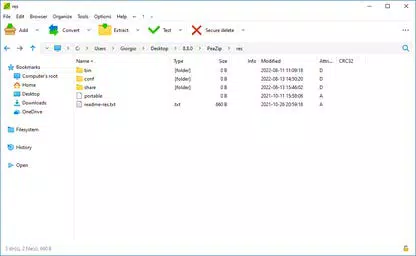
PeaZip (64-bit) features a straightforward interface that emphasizes clarity and ease of use. The layout is organized into logical sections, with clear icons and labeled menus that guide users through common tasks such as adding files to an archive, extracting contents, or changing compression settings. Navigation is consistent across functions, minimizing confusion and enhancing user efficiency.
The visual style is minimalistic and functional, avoiding unnecessary design elements that could distract from core operations. Although the developer did not list formal performance metrics, the app maintains responsive behavior during typical use cases such as extracting multi-gigabyte archives or converting between formats. Users can expect stable operation across different device categories, including systems with moderate hardware specifications.
While the app may not match the speed of some premium tools in high-volume processing, its reliability and consistent performance make it a dependable choice for daily file management. Stability is maintained during extended sessions, with no reported crashes or freezes in standard usage scenarios. The user experience is further enhanced by the absence of intrusive ads or telemetry, aligning with the expectations of privacy-conscious users.
Platform Compatibility & Technical Requirements
PeaZip (64-bit) is designed for the Windows operating system and requires a 64-bit architecture to run. The current version, 7.7.1, is available as a standalone executable with a file size of 22.8 MB, making it lightweight and quick to install. The developer did not specify minimum OS requirements, nor did they provide information on compatibility with older Windows versions.
Given its 64-bit nature, the app is optimized for modern Windows environments, including Windows 10 and Windows 11. It is not available for mobile platforms such as Android or iOS, limiting its use to desktop users. Users should ensure their system meets the basic demands of a 64-bit Windows environment before installation. The app does not require administrative privileges for standard operation, enhancing accessibility for a broad user base.
Pros and Cons
Pros
- Free to download and use with no hidden costs
- Supports over 150 archive formats, ensuring broad compatibility
- Includes strong password protection and encryption features
- Simple, intuitive interface suitable for beginners and advanced users alike
- Lightweight at 22.8 MB, with minimal system resource usage
- Open-source and privacy-focused with no telemetry or ads
Cons
- Performance may be slower compared to premium compression tools
- Developer did not specify minimum OS requirements
- Not available on mobile platforms like Android or iOS
- Interface design is functional but lacks modern visual polish
- Advanced features may require some technical understanding to use effectively
FAQ
Is PeaZip (64-bit) safe to download and install?
Yes, PeaZip (64-bit) is a trusted, open-source utility that is regularly maintained and distributed through official channels. It does not contain malware or intrusive behavior.
Can I use PeaZip to open RAR files?
Yes, PeaZip supports opening RAR archives, along with a wide range of other formats including 7Z, ZIP, ARC, and BZip2.
Does PeaZip support password-protected archives?
Yes, users can create and extract password-protected archives using strong encryption standards, with options for both master and individual passwords.
Is PeaZip available for Android or iOS?
No, PeaZip (64-bit) is currently only available for Windows and is not supported on mobile operating systems.
How often is PeaZip updated?
The app receives regular updates to improve compatibility, security, and functionality. The latest version, 7.7.1, was released on April 26, 2023.
Final Thoughts
PeaZip (64-bit) stands out as a capable, free utility for managing compressed files on Windows. Its comprehensive format support, built-in security features, and user-friendly interface make it a valuable tool for both casual users and professionals. While it may not deliver the fastest performance compared to commercial alternatives, its reliability, lightweight design, and strong privacy stance offer significant value. The app is especially well-suited for individuals who prioritize file security, format versatility, and cost-free access to essential archive management tools.
For anyone seeking a secure, free, and efficient way to handle compressed files, PeaZip (64-bit) delivers a robust solution. Its ability to manage multiple formats, protect data with passwords, and operate without ads or tracking makes it a standout in the utilities category.
Download PeaZip (64-bit) now


